Posts

Pythonanywhere insufficient_quota message='OpenAI API error received' stream_error=False

  openai.error.InvalidRequestError: The model: `davinci-codex` does not exist 2023-06-05 17:21:16,816: Error running WSGI application 2023-06-05 17:21:16,819: File "/home/PetCharmWorld/mysite/flask_app.py", line 30 2023-06-05 17:21:16,819: 2023-06-05 17:21:16,819: response = openai.Completion.create(**completion_params) 2023-06-05 17:21:16,819: 2023-06-05 17:21:16,819: IndentationError: unexpected indent 2023-06-05 17:21:16,819: File "/var/www/petcharmworld_pythonanywhere_com_wsgi.py", line 16, in <module> 2023-06-05 17:21:16,819: from flask_app import app as application # noqa 2023-06-05 17:21:16,820: *************************************************** 2023-06-05 17:21:16,820: If you're seeing an import error and don't know why, 2023-06-05 17:21:16,820: we have a dedicated help page to help you debug: 2023-06-05 17:21:16,820: https://help.pythonanywhere.com/pages/DebuggingImportError/ 2023-06-05 17:21:16,820: **************************...
Pythonanywhere: Internal Server Error

  Pythonanywhere: Internal Server Error The server encountered an internal error and was unable to complete your request. Either the server is overloaded or there is an error in the application. How to fix: The "Internal Server Error" you're encountering on PythonAnywhere indicates that there is an issue with your web application that is causing it to fail. This error message is a generic one and does not provide specific details about the underlying problem. Here are a few steps you can take to troubleshoot the issue: 1. Check the error logs: PythonAnywhere provides error logs that can give you more information about the error. You can access the error logs by going to the "Web" tab on your PythonAnywhere Dashboard, finding your web app, and clicking on the "Logs" link. Look for any error messages or stack traces that can help identify the cause of the internal server error. 2. Check your code: Review your code, paying attention to any recent chang...

Pythonanywhere Error The model: `davinci-codex` does not exist

  2023-06-05 17:18:27,770: error_code=model_not_found error_message='The model: `davinci-codex` does not exist' error_param=None error_type=invalid_request_error message='OpenAI API error received' stream_error=False 2023-06-05 17:18:27,772: Exception on /generate [POST] Traceback (most recent call last): File "/usr/local/lib/python3.10/site-packages/flask/app.py", line 2077, in wsgi_app response = self.full_dispatch_request() File "/usr/local/lib/python3.10/site-packages/flask/app.py", line 1525, in full_dispatch_request rv = self.handle_user_exception(e) File "/usr/local/lib/python3.10/site-packages/flask/app.py", line 1523, in full_dispatch_request rv = self.dispatch_request() File "/usr/local/lib/python3.10/site-packages/flask/app.py", line 1509, in dispatch_request return self.ensure_sync(self.view_functions[rule.endpoint])(**req.view_args) File "/home/PetCharmWorld/mysite/flask_app.py", li...

Pythonanywhere Error jinja2.exceptions.TemplateNotFound: index.html

 Error log: 2023-06-05 17:15:49,381: Exception on / [GET] Traceback (most recent call last): File "/usr/local/lib/python3.10/site-packages/flask/app.py", line 2077, in wsgi_app response = self.full_dispatch_request() File "/usr/local/lib/python3.10/site-packages/flask/app.py", line 1525, in full_dispatch_request rv = self.handle_user_exception(e) File "/usr/local/lib/python3.10/site-packages/flask/app.py", line 1523, in full_dispatch_request rv = self.dispatch_request() File "/usr/local/lib/python3.10/site-packages/flask/app.py", line 1509, in dispatch_request return self.ensure_sync(self.view_functions[rule.endpoint])(**req.view_args) File "/home/PetCharmWorld/mysite/flask_app.py", line 9, in home return render_template('index.html') File "/usr/local/lib/python3.10/site-packages/flask/templating.py", line 149, in render_template ctx.app.jinja_env.get_or_select_template(template_name...

Hosting Task Manager App in PythonAnywhere: Step-by-Step Guide

  Introduction: Hosting your web application on a reliable platform is crucial to make it accessible to users worldwide. PythonAnywhere is a popular platform that allows you to deploy and run Python applications in the cloud. In this tutorial, we will walk through the process of hosting a Task Manager app on PythonAnywhere. We will cover the following steps: Add a New Web App: Navigate to the PythonAnywhere dashboard and log in to your account. Click on the "Web" tab and then click "Add a new web app" to create a new application. Add Python Code in /home/ziaasp/mysite/flask_app.py: In the "Code" section of the PythonAnywhere dashboard, click on the "Go to Directory" link for the newly created web app. Inside the web app directory, create a new file called flask_app.py . Copy and paste your Flask application code into flask_app.py . Make sure to include all the necessary dependencies and routes. Create a New Folder Called "templates" and...

From Beginner to Intermediate: Exploring Flask's Features with a Task Manager App

Image
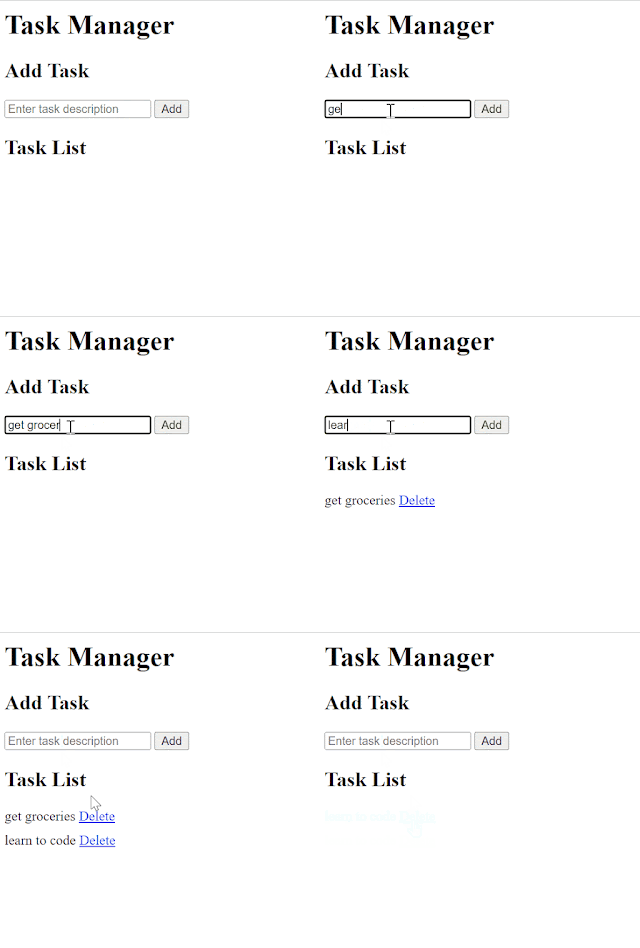
  Here's an example of an intermediate-level Flask app that incorporates more features and functionality: python Copy code from flask import Flask, render_template, request, redirect, url_for app = Flask(__name__) # Sample data tasks = [] @app.route( '/' ) def index (): return render_template( 'index.html' , tasks=tasks) @app.route( '/add' , methods=[ 'POST' ] ) def add_task (): task = request.form[ 'task' ] tasks.append(task) return redirect(url_for( 'index' )) @app.route( '/delete/<int:task_id>' ) def delete_task ( task_id ): if task_id < len (tasks): del tasks[task_id] return redirect(url_for( 'index' )) if __name__ == '__main__' : app.run(debug= True ) In this example, we have an app that allows users to add and delete tasks. Here's an overview of the functionality: The index() function renders the index.html template and passes the tas...